 Available in AU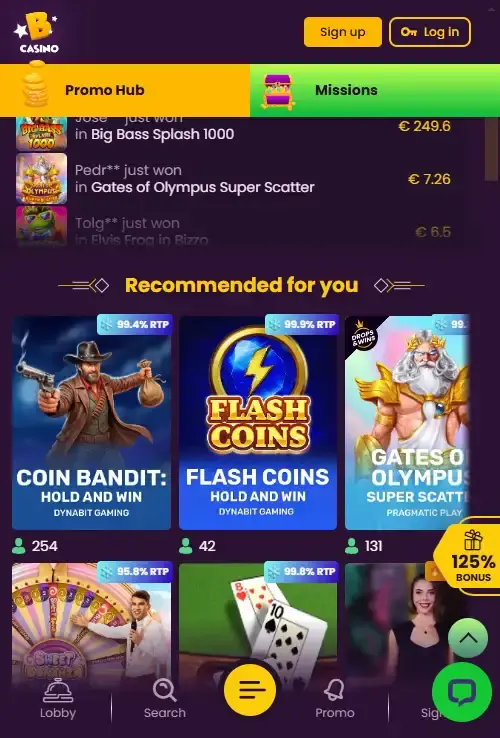
Bizzo Casino Mobile: Browser Play vs PWA Experience
A mobile browser site opens in Safari, Chrome or another browser and runs as a responsive version of the website. A progressive web app, or PWA, is still web technology, but it can be added to the home screen and opened in a more app-like window. A native app is a separate application package distributed through an app store or another explicit installation route.
Bizzo’s current evidence supports the first two categories: mobile-browser use and a PWA-style installation option. No current source establishes a native App Store or Google Play build. That distinction prevents a common review error where any home-screen shortcut is called an “iOS app” or “Android app” even though the product is still the website running as an installed web experience.
| Access type | What it means | Bizzo status in this guide |
|---|---|---|
| Mobile browser | Open the casino URL in a phone browser | Verified for iOS and Android |
| PWA-style install | Add the web experience to the home screen for app-like access | Supported by current sources |
| Native store app | Separate app distributed through an official app marketplace | Not treated as verified here |
How to use Bizzo on iPhone
On an iPhone, the straightforward route is to open Bizzo in the browser and use the responsive site. Current sources support browser compatibility on iOS, and current independent reviews continue to describe Bizzo as a mobile-browser casino. This avoids the need to search the App Store for similarly named products that may have no connection to the operator.
If Bizzo presents an install option through the browser, that should be understood as a web-app or PWA-style shortcut rather than proof of a native iOS build. The exact menu labels can depend on the browser and iOS version, so this page does not give a rigid tap-by-tap sequence that could become outdated. The essential check is that the page you add to the home screen is the real Bizzo site you intentionally opened.
Before playing for real money, test basic navigation in portrait orientation: game categories, account menu, support access and cashier. A responsive design can technically fit the screen while still making a particular control awkward to use, so practical usability matters more than the label “mobile compatible”.
How to use Bizzo on Android
Android access follows the same browser-first logic. Open Bizzo in an up-to-date browser and use the responsive site. The verified fact is mobile-browser support, not dependence on a downloadable APK. If an install prompt appears, verify that it comes from the official Bizzo web experience rather than from a third-party download page.
A PWA can feel close to a conventional app because it can have a home-screen icon and open without the usual browser chrome. That does not automatically mean it has all the permissions, update mechanisms or store review processes associated with a native Android application. For a casino user, the main practical benefit is faster access to the same web product, not a fundamentally different account.
Do not install unrelated files simply because a search result uses the Bizzo name. This guide does not provide APK links, app-store buttons or third-party download mirrors. Browser access is already enough to reach the mobile service described in the current evidence.
What a PWA changes – and what it does not
The biggest change is presentation and convenience. A PWA-style installation can place Bizzo on the home screen and can open in a cleaner, app-like view. It may reduce the friction of typing or bookmarking the site every time. The account, balance and underlying casino service still belong to the same web platform.
A PWA does not create a second casino account, change the operator’s licence, alter the withdrawal rules or make a game safer. It also does not prove that every feature behaves identically offline or in the background. Casino gameplay still requires an internet connection because game state, account balance and real-money transactions are handled by remote systems.
This matters when comparing reviews. A reviewer might say “Bizzo app” as shorthand for the home-screen experience, while another source may say there is no native app. Those statements can describe the same reality if the product is a PWA. This page uses the more precise terminology so readers know what they are actually installing.
Games on a smaller screen
Bizzo’s broader game library is covered in the Bizzo game library. On mobile, the more useful question is whether the categories you care about remain usable on a phone. Current reviews describe access to the casino lobby through the browser, and modern slot interfaces generally adapt to smaller screens, but a game-by-game compatibility guarantee would require testing individual titles. Whether you use an iPhone or an Android device, you can easily access all your favourite Bizzo Casino pokies and table games directly on the go.
Live casino deserves extra attention because video, betting controls, table information and chat can compete for limited screen space. If live dealer play matters to you, open the category in the browser and make sure the bet controls and table information are readable before committing to a session. The dedicated live-casino page covers the verified categories and providers without assuming every table is equally comfortable on mobile.
For slots, test navigation and orientation. Some games are easier in portrait, others in landscape. Avoid judging the entire mobile experience from one title because game interfaces are supplied by different studios and can behave differently even inside the same casino lobby.
Cashier and account checks on mobile
Current independent testing describes cashier and account functions as available through Bizzo’s mobile browser experience. That makes a phone viable for routine account access, but payments deserve more care than simple lobby browsing. On a small display, verify the payment method, amount, currency and any network or account details before confirming a transaction.
The Bizzo payment methods guide covers AUD-facing deposit categories and explains why deposit methods and withdrawal methods should be checked separately. If you intend to cash out from mobile, the same account-verification requirements still apply. A PWA shortcut does not bypass KYC or change the payout rules.
For document uploads, use a stable connection and check that the file is readable before submitting it. Do not send identity documents through unofficial messaging channels just because you are using a phone. The account and verification page explains the broader KYC context.
Mobile usability checklist
- Open Bizzo from the intended official site rather than from an unfamiliar app-store or download listing.
- Confirm that the lobby navigation fits the screen and that search or provider filters are usable.
- Open one slot and, if relevant, one live table to test readability and orientation.
- Check that account, support and cashier controls remain accessible without desktop mode.
- If offered a home-screen install, understand that a PWA-style shortcut is still the web service.
- Before a payment, recheck amount, currency and selected method on the final confirmation screen.
- Use a secure device lock and avoid leaving an authenticated casino session open on a shared phone.
- Do not treat the presence of a home-screen icon as evidence of local regulatory approval.
Mobile access does not change Australian regulatory status
Being able to load a casino on a phone is a technical-access fact, not a statement about Australian authorisation. Bizzo’s mobile compatibility and its regulatory position are separate dimensions. Australian law and ACMA enforcement are covered on the Bizzo licence and trust page and the dedicated Australia-law page.
This separation is useful because mobile availability can otherwise look like an endorsement from a platform vendor, browser maker or app store. A web app can work perfectly well on an Australian device without being part of Australia’s locally authorised online-casino framework. Device compatibility answers “can the interface run?” while licensing and enforcement answer a different question.
When the PWA is useful
The PWA-style option is most useful if you visit Bizzo regularly and want a direct home-screen entry without searching for the site in browser history. It can also create a cleaner full-screen feel. For an occasional user, a normal bookmark may achieve much of the same convenience with less confusion about whether an app has been installed.
Neither option improves the underlying odds of games, speeds up KYC by itself or guarantees faster withdrawals. The decision between browser tab and PWA is therefore mainly about interface preference. If you care more about game choice, payment methods or account verification than about launch convenience, those topics deserve more weight than whether the site has an icon on your home screen.
Bottom line
Bizzo is a browser-first mobile casino experience for iPhone and Android, with a PWA-style install option supported by current sources. Experience seamless and optimized mobile gaming at the leading online casino in Australia without the need to download any extra applications. This guide does not present a native App Store or Google Play build as verified, and it does not link to third-party download packages.
For most users, the practical test is simple: open the real site in your phone browser, check that the lobby, account and cashier functions you need are usable, and add the web experience to the home screen only if that convenience is valuable to you. Use the full Bizzo Casino Australia review for the broader verdict and the Bizzo account and KYC guide for account-specific checks.
Sources and freshness
Mobile-browser availability was rechecked on 27 August 2026 against current independent Bizzo reviews. Current sources also record a PWA-style install option from two independent sources. Because current public search results use inconsistent “app” terminology, a native iOS or Android store app is not treated as verified.